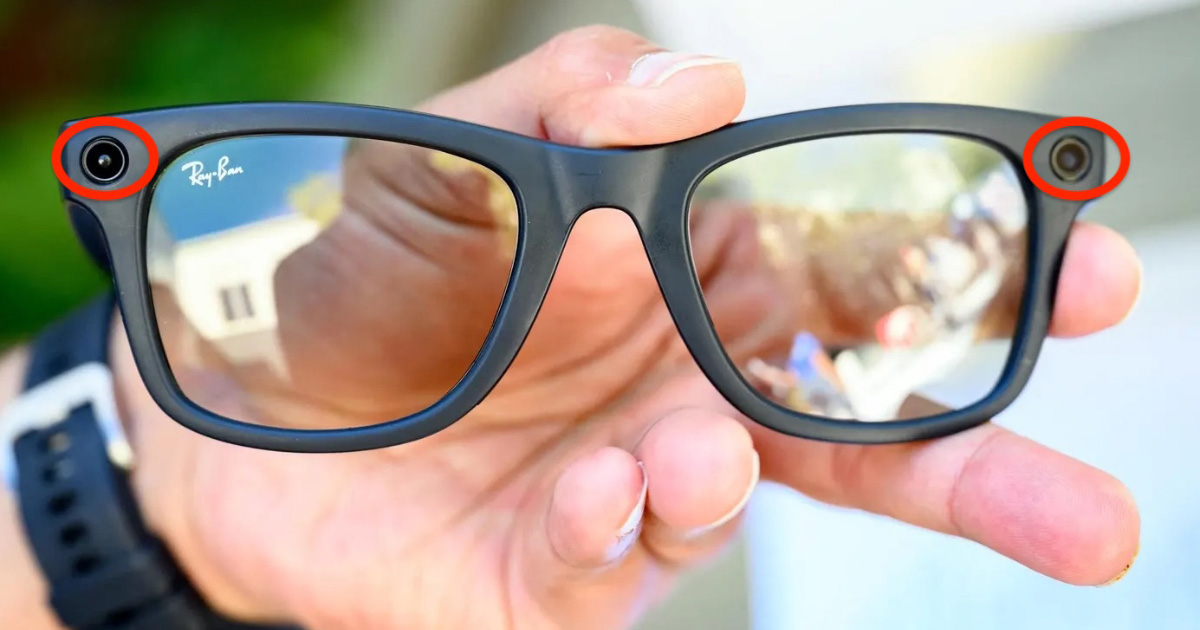
Smart glasses are becoming more common, and many providers may not realize that they are capable of recording video, taking photos, livestreaming, and capturing audio. For independent providers, this creates a growing privacy concern, especially during in-person appointments where discretion is critical.
One of the most widely used examples today is the Ray-Ban Meta Smart Glasses created by Meta (formerly Facebook) in partnership with Ray-Ban.
This article explains what these glasses look like, how recording works, and what signs to watch out for.
What Are Meta AI Glasses?
Meta’s smart glasses look very similar to regular Ray-Ban sunglasses or prescription glasses. Unlike older wearable tech, they are intentionally designed to blend in and avoid looking “techy.”
These glasses can:
- Record video with audio
- Take photos
- Make phone calls
- Livestream directly to social media
This means someone could potentially record you without pulling out their phone.

What Do They Look Like?
The most common models resemble standard Ray-Ban Wayfarer frames.
Some details that may distinguish them from ordinary glasses:
- Slightly thicker frame arms (to house electronics and batteries)
- Small camera lenses near the corners of the frame
- Tiny speaker openings in the arms
- A touch-sensitive side panel
- The wearer looks like a complete fucking dork while wearing them
However, many people would not notice these differences immediately.
Do Meta Glasses Show a Recording Light?
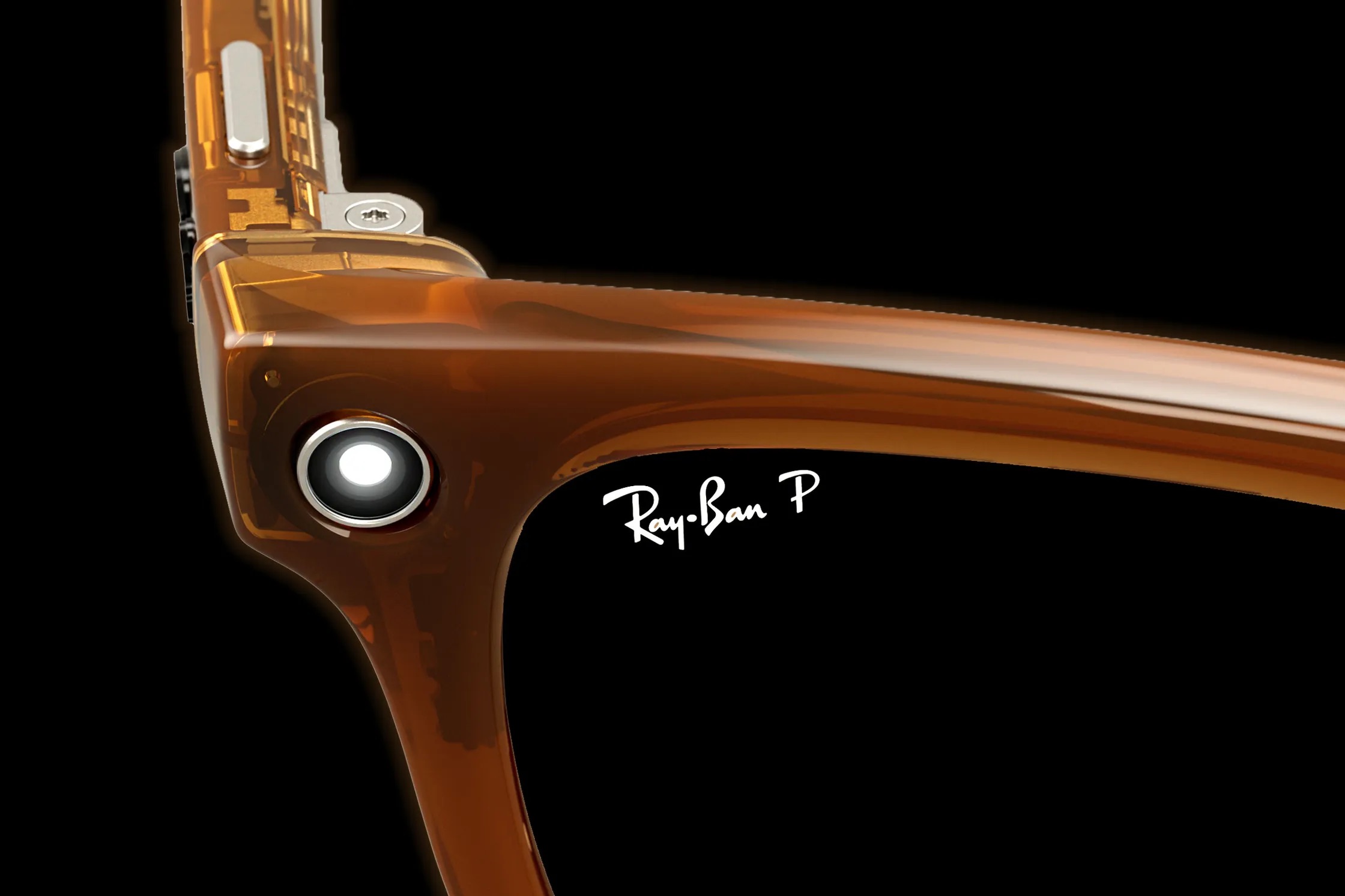
Yes, Meta includes a built-in LED privacy indicator light that turns on while recording video or taking photos.
The light is located on the front of the glasses near one of the cameras.
When recording:
- A small white LED light appears on the front of the frame
- The light is visible from the outside
- The light may blink or remain solid depending on the action
According to Meta, the LED is designed so that people nearby can tell when recording is happening. If the light is covered or tampered with, the glasses may display warnings or stop functioning properly. However, this is not foolproof and there are many videos on social media with instructions on how to disable the light.
Many people also simply do not know what the indicator light means.
Other Signs Someone May Be Recording
Besides the LED light, there are a few behavioral clues that may suggest someone is using smart glasses actively:
The wearer may quietly say phrases like:
- “Hey Meta, take a photo”
- “Hey Meta, start recording”
The user may repeatedly tap or swipe the side arm of the glasses.
Someone recording may also:
- Keep their head unnaturally pointed toward you
- Avoid removing sunglasses indoors
- Frequently adjust the frames
- Position themselves for better camera angles
None of these signs guarantee recording, but they can be worth noticing.
What You Can Do to Protect Yourself
1. Create a No-Recording Policy
Consider clearly stating on your website or booking form that:
- Recording is strictly prohibited
- Smart glasses must be removed during appointments
- Phones and wearable devices need to be placed aside
Clear policies make enforcement easier.
2. Watch for Wearable Tech
Increasingly, recording devices include:
- Smart glasses
- Smart watches
- Lapel cameras
- AI pins
- Wireless earbuds with microphones
3. Trust Your Instincts
If someone seems evasive about their glasses or refuses to remove them, especially during intimate momements, that is a clear indicator that something fishy is going on. They could also be LE gathering evidence against you.
Final Thoughts
Wearable AI devices are becoming more sophisticated and harder to recognize. While Meta’s glasses do include a recording indicator light, it is not always easy to notice in real-world settings.
The safest approach is to treat smart glasses the same way many providers already treat phones: as devices capable of recording.
Awareness, clear boundaries, and proactive screening are becoming increasingly important as wearable technology becomes more mainstream.